
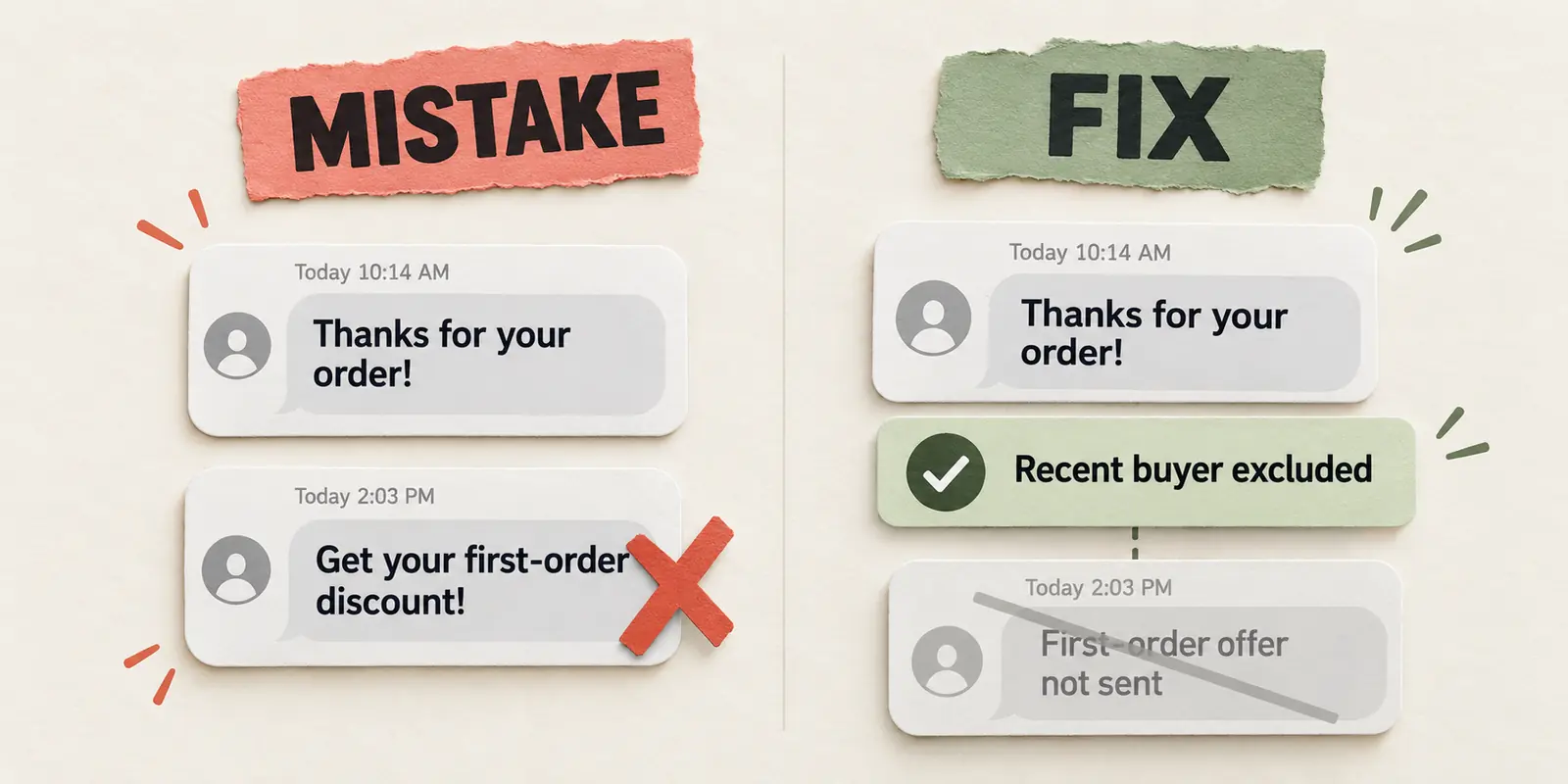


The most common SMS marketing mistakes are sending without permission, texting too often, targeting the wrong shoppers, leaving replies unanswered and trusting revenue numbers without understanding them. Most are easier to spot when you look at what one subscriber receives, rather than judging each message on its own.
Think about a shopper who signs up, buys a product and then gets a first-order discount the next morning. The copy might be polished. The offer might be generous. But the message already feels out of touch.
This guide covers 11 mistakes and the practical changes that address them. Start with permission and opt-outs: if either is failing, pause the affected marketing sends before working on copy, timing or offers.
You’ll see two terms throughout: a campaign is a one-time send, such as a sale announcement; a flow is an automated sequence, such as a welcome series or cart reminder. Shoppers receive both, so both count toward their experience.
1. Treating a phone number as permission to send promotions
A shopper gives you a phone number so you can update them about an order. A week later, you add that number to a sale campaign. They may know your store, but they never agreed to hear about your promotions.
Keep marketing permission separate from the other reasons someone shares a number. A purchase, an email subscription or a list bought from another business does not establish SMS marketing consent. Sending a welcome text afterward won’t fill that gap.
Before adding contacts, make sure you can trace their permission to the signup source, timestamp and wording they saw. That applies to imported lists too. If you can’t establish permission, leave those contacts out of promotional sends.
For a Shopify store, keep these basics together:
- Collect and record SMS marketing permission through your signup process.
- Explain what subscribers can expect and how they can leave.
- Keep your privacy policy and terms consistent with the program you run.
Shopify Messaging’s requirements apply to that service; a third-party app may have different requirements. The message purpose, recipient region and applicable laws also matter. Use our SMS marketing compliance guide and marketing consent guidance for a closer review, or browse SMS opt-in examples to improve the signup itself.
This is not legal advice. You’re responsible for obtaining valid marketing permission and keeping the records.
2. Making it easy to unsubscribe, then texting anyway
“Reply STOP to unsubscribe” sets a clear expectation. If another promotion follows, you’ve ignored the request to stop.
Make sure an opt-out stops future marketing across your campaigns and automated messages. Pay attention to list imports and connected tools too: an old file should never quietly put an unsubscribed person back into your promotions.
In TxtCart, subscribers can unsubscribe by replying STOP or CANCEL. Other tools have their own handling, so an SMS opt-out should not be assumed to update every external system.
Try the experience with a number you own. Subscribe, opt out and confirm that the number stays out of subsequent marketing sends. If it doesn’t, fix that before sending again.
3. Choosing a send time that works for you, not the shopper
A sale goes live in your time zone. Your subscribers may be asleep in theirs. Even a relevant offer can arrive at an unwelcome hour.
Start with the quiet-hour requirements that apply to your recipients. Once the message is eligible to send, test timing against your own clicks, replies and purchases. A generic “best time” chart cannot tell you when your shoppers want to hear from you.
TxtCart’s regional quiet-hour controls hold messages captured during local quiet hours until the next sending window. That helps avoid an overnight interruption, but it also makes the offer’s expiry important. A sale reminder held overnight is no use if the sale ends before it arrives.
When timing seems wrong, compare the scheduled time with the actual arrival. Then make sure the offer will still be valid when the message reaches the shopper. Platform safeguards support your program; they don’t replace understanding the rules that apply to it.
4. Letting campaigns and automated messages pile up
Your team sends two promotions a week. That sounds reasonable until a new subscriber also receives a welcome series, a cart reminder and a follow-up around the same time.
Shoppers experience one stream of texts from your store. They don’t separate the campaign calendar from your automations.
Read a few subscribers’ messages in order around a busy promotion. Look for repeated offers, reminders that no longer make sense and several sends competing for attention. Changing “Your cart is waiting” to “Still thinking it over?” won’t give a duplicate reminder a useful purpose.
Decide which message matters most and remove the competing send. TxtCart’s Campaigns lets you include and exclude groups of subscribers, while Smart Sending, when enabled on a flow message step, prevents a send if the shopper recently received a message.
Build your SMS flows around what the shopper does next, including when a follow-up should change or stop. Make sure the controls are enabled on the messages you rely on, and consider email promotions alongside SMS. One SMS setting does not coordinate every channel.
5. Adding a first name without making the offer relevant
“Hi Alex” doesn’t make a first-order discount useful to Alex after they’ve already bought. Personalization starts with choosing the right recipient.
Work backward from the offer. Who is it for, and who should be left out? A first-purchase offer needs different recipients from a repeat-order promotion. A customer who bought yesterday has a different relationship with your store from someone who has only browsed.
TxtCart supports custom segments and campaign exclusions, including recent purchasers. For the first-order example, exclude recent buyers before sending. Then sample both groups: the buyer should be out, and the eligible non-buyer should still be in.
Use your buying cycle to define other groups. A month without a purchase might be normal for your products, so don’t automatically label that shopper a lapsed customer. Our SMS segmentation guide explains ways to group subscribers around more useful differences.
6. Making subscribers guess who is texting
An unfamiliar number sends “Your offer is waiting.” Which store? What offer? A subscriber shouldn’t need to open an old thread or follow a link to work that out.
Name your store clearly in the message. Huckberry’s text begins with “Huckberry:” before introducing the offer, giving the reader that context immediately. If you use a team member’s name, include the store name too.

Read your test message on a phone without a saved contact. The business and reason for texting should be recognizable. If you invite a reply, make sure the sending setup accepts one and the reply reaches someone who can help. Sender options vary by provider and region, so choose the setup that supports the experience you’re promising.
7. Inviting a conversation that nobody answers
A shopper replies to a restock text: “Does this come in medium?” The next thing they receive is another reminder to buy. Their question is still unanswered.
Replies tell you what stands between interest and purchase. Decide who handles product, shipping and offer questions before adding “Just text us” to your next promotion. Keep requests to unsubscribe separate from sales conversations.
For a small team, this is where TxtCart’s AI Agent can take on routine work. Its product search and inventory skills can find Shopify product information and answer availability questions about variants such as size and color. It reports availability rather than exact stock counts, and questions that need a person can be escalated to your team.
Test a product question and an exception through the reply path you plan to use. Automatic handling depends on your setup; it isn’t something to assume for every campaign reply.
Repeated questions can also reveal something to fix before the next send. If shoppers keep asking whether a code applies to sale items, make the restriction clearer in the offer.
8. Promising an offer that falls apart after the click
Imagine a signup discount that sends shoppers to a sale collection, only for checkout to reject the code on sale items. The shopper followed your offer, but can’t use it on the products you sent them to.
Follow the actual text on your phone, through the product page, cart and checkout. Make sure:
- The link opens the intended product, collection or cart.
- The item or variant is available.
- The discount works for the advertised products and intended recipients.
- Expiry, minimum spend, exclusions and shipping terms are clear and consistent.
- The page is usable on mobile and the next action is obvious.
Fix the mismatch before rewriting the call to action or adding a bigger discount. The message can only do so much if the offer stops working at checkout.
Choose the action that fits the shopper’s task. Sometimes that means “Shop the collection.” Sometimes it means replying with a question before choosing a product. Every text needs a clear next step, but that step doesn’t always need to be a link.
9. Sending without seeing the final message or cost
A missing name, the wrong link or a discount that doesn’t appear correctly can undo an otherwise useful message. These are errors to catch before subscribers see them.
Send yourself the finished text. Read the version that arrives, tap the link and try the offer. For automated messages, use the relevant trigger so you know the name, product reference or discount has the data it needs.
Then review the segment count and cost. SMS length depends on character encoding: some characters, including many emojis, leave less room in each segment. A longer text can use multiple segments, so a small copy edit can change the cost.
TxtCart’s campaign review shows estimated recipients, messages per recipient, segments and cost. Review those estimates after the final copy and recipient changes, while you can still correct a surprise.
10. Calling a test too early or changing everything at once
One message has a new discount, a new call to action and a different send time. The other goes to a different group of shoppers. Even if one produces more orders, you won’t know which change to repeat.
Start with one question. An illustrative copy test could compare “Shop the restock” with “See what’s back in your size,” keeping the offer, timing, destination and recipient groups comparable. Choose the outcome you care about before sending.
Use randomly assigned groups where your setup supports them, and give the test enough relevant outcomes to support a decision. A handful of purchases can leave the result inconclusive. That is more useful to acknowledge than declaring a dependable winner from too little data.
TxtCart supports campaign A/B testing. Its flow-specific Optimized A/B Test routes future subscribers to a variation after applying your chosen criteria and duration. Automatic selection still depends on a useful test and enough evidence; it doesn’t guarantee statistical certainty.
Our SMS A/B testing examples can help you choose the next question to test. First make sure both versions work: a broken link is a correction to make, not an experiment to run.
11. Assuming more attributed revenue means better results
Your dashboard credits more revenue to SMS this month. Before repeating the campaign, find out whether the messages improved or the reporting changed.
A wider attribution window can give SMS credit for more orders. A different group of recipients or fewer excluded orders can change the figure too. Those changes don’t, on their own, show that your texts persuaded more people to buy.
Keep the comparison consistent. Compare campaigns with campaigns and flows with flows, using similar recipients and offers. Include costs and opt-outs alongside clicks, replies and orders.
TxtCart’s attribution settings control which orders receive credit and allow stricter rules for individual flows and messages. An attribution rule determines which orders qualify for credit. An attribution window determines how long after the relevant message or interaction an order can qualify. Campaign and flow options differ.
More credited revenue is not automatically more profit or additional sales caused by SMS. The SMS marketing analytics guide explains the measurement details when you’re ready to compare results.
Follow one subscriber through your next promotion
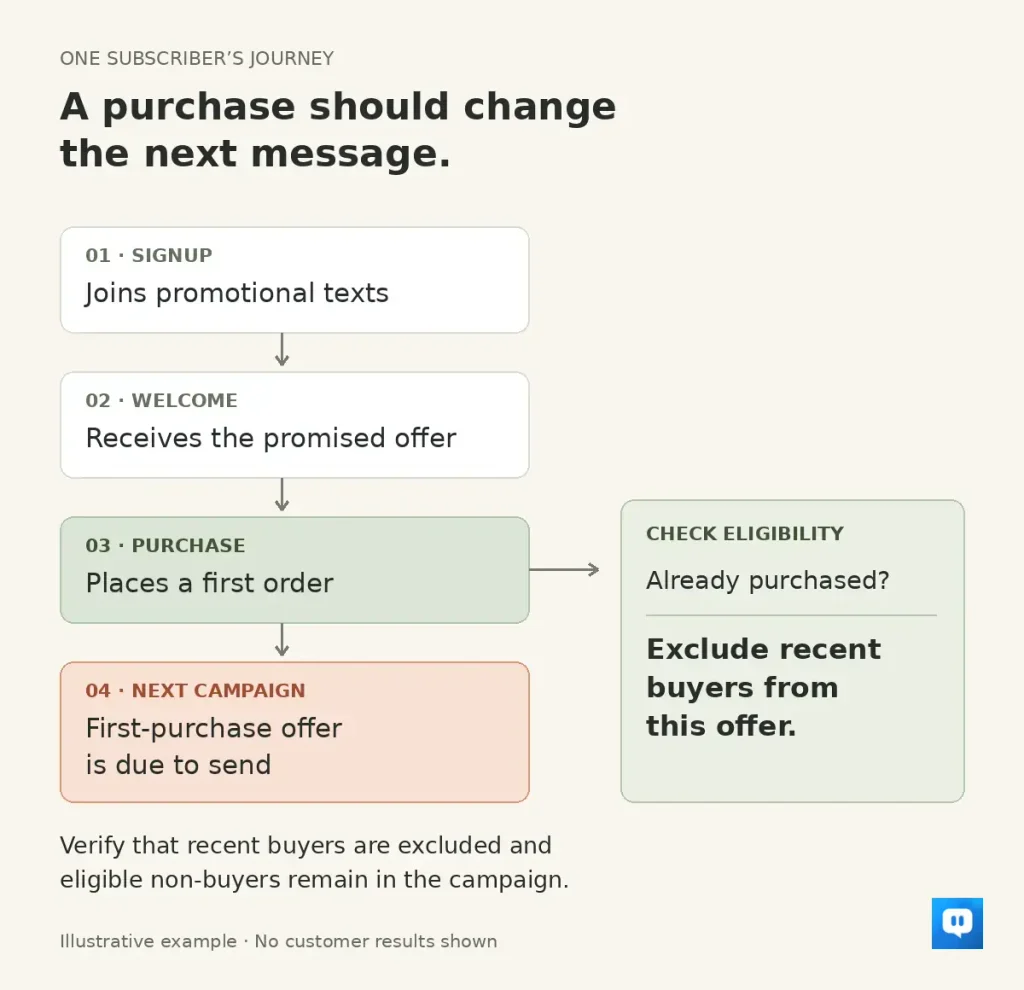
The mistakes above often overlap. This fictional journey shows how to find the point where a message stops making sense, without assuming any customer result.
Signup and welcome
A shopper joins Store A’s early-access list. The welcome text should deliver the promised access and identify the store. Start with a fresh signup to make sure the consent record and first message match what the form promised.
Purchase before a scheduled promotion
The shopper buys before a first-purchase offer is due. They should now be excluded from that offer. Make sure recent buyers are out of the campaign and eligible non-buyers are still included.
Several messages close together
An automated follow-up falls near another promotion. Read the two together. If they repeat the same offer or reminder, choose which one should take priority and adjust the sequence or exclusions. Then use the message history to confirm the duplication has stopped.
A question before the next purchase
The shopper asks whether a blue item comes in medium. A useful next step is an availability answer or a handoff to someone who can help. Send that question through your own setup to make sure it reaches the right place.
The performance review
First confirm that the specific problem is fixed: the buyer is excluded, the duplicate reminder is gone or the question gets answered. Then compare subsequent sends using consistent reporting and cost definitions. A corrected journey and a sales increase are separate observations; this sequence alone cannot prove a lift.
Frequently asked questions
Which SMS marketing mistake should I fix first?
Fix missing marketing permission or failed opt-out handling first, pausing the affected sends while you do. After that, follow a subscriber’s messages through to the purchase or reply. Address the first clear break in that experience before changing several things at once.
How often is too often to send promotional texts?
There’s no universal number. Count campaigns and automated texts together, consider what you promised at signup, and look at relevance and opt-out trends across comparable sends. Fewer campaigns won’t solve the problem if automated reminders still pile up around them.
What should happen when someone replies to a marketing text?
Their reply should reach a person or a configured system that can help, with a human handoff when needed. Decide who owns that response before inviting questions. A request to unsubscribe should stop marketing, not trigger another sales follow-up.
Make the next message worth receiving
Choose one problem you’ve found: the wrong recipient, a repeated reminder, an offer that fails at checkout or a question left unanswered. Fix it and follow the journey again before increasing volume.
TxtCart brings campaign targeting, automated flows and shopper conversations together so lean ecommerce teams can run more relevant SMS on Shopify. Exclusions help keep offers away from the wrong recipients, Smart Sending can prevent unnecessary repeat contact, and the AI Agent can answer supported buying questions while your team handles exceptions.
You still own the permission, offer and customer experience. If you need a better way to manage the messages and conversations around them, book a demo to see how TxtCart fits your store.